What I learned Building a CHIP-8 Interpreter
Overview
This is a post detailing my experience writing an interpreter for the CHIP-8 language using C# with the MonoGame framework. The project can be found here and is dedicated to the public domain under the CC0 license.
What is CHIP-8
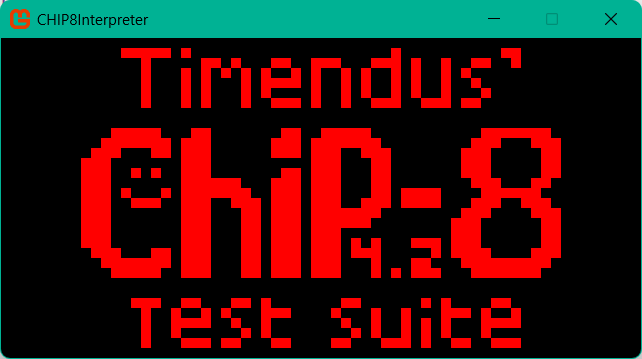
CHIP-8 is a programming language from the 1970s which was used to make simple games for systems like the COSMAC VIP. It is an 8-bit system with 4 kilobytes of RAM and a 64x32 single-color display. As these specs suggest, it is a very minimal system, perfect for learning the basics of building an interpreter or emulator.
What I Made
Tools
To create my CHIP-8 interpreter, I decided to use C# and .NET along with the MonoGame framework. This is the language I am most comfortable in, so that allowed me to focus my learning on the interpreter, rather than the programming language.
Overview of the Program
I split my codebase into 3 major classes:
- The Chip8 class holds the specifications. Things like the RAM, stack, registers, and program counter are stored in this class. When it is constructed, a font that programs may use is loaded into the RAM. A ROM may also be loaded into RAM if one is passed into the constructor.
- The Interpreter class handles the fetching, decoding, and executing of instructions. When it is constructed, the class takes a Chip8 object, as well as some optional parameters like the compatibility mode, clock speed, and keypad layout. Each cycle, the Fetch method fetches the next instruction, which is decoded and passed on to the Execute method.
- The final class is the Game class, which is where the MonoGame-specific code is located. This class is responsible for actually showing the display on your screen, handling keyboard input, and playing sounds.
When the program is started, 3 threads are created and started. One is for the MonoGame logic, one for the interpreter, and one for handling the two timers of the CHIP-8.
CHIP-8 Specifications
The CHIP-8 is composed of several components:
- The RAM is 4 kilobytes, separated into 4096 addressable bytes. The first 512 bytes of RAM were traditionally reserved, so programs tend to start at the 512th byte. In my program, this space is used to store font sprites.
- The display is 64x32 pixels, where each pixel is either on or off. This is represented in my program as an array of 32 64-bit integers. Each bit represents a single pixel on the screen.
- The program counter is a 16-bit integer which points to the instruction the interpreter is to execute next. Because the RAM is only 4096 bytes, only the first 12 bits are actually used, as that is enough to go from 0 to 4095.
- The index register is also a 16-bit integer which points to a memory address in RAM. This can be used by programs to read from and write to the RAM. Again, only 12 bits are actually needed for this.
- The stack is an array of 16 16-bit integers. This is used when programs run subroutines. When a subroutine is started, the current value of the program counter is pushed to the stack. When it is time to return from a subroutine, the most recent value on the stack is popped and the program counter is set to this value. Being a stack rather than just a single integer allows subroutines to be nested and properly return to the correct place in memory.
- There is both a delay and sound timer. These both function similarly. When the value of either timer is greater than 0, the timer is decremented at a rate of 1 every 60th of a second. The delay timer does nothing on its own, but programs can set or retrieve the current value of the timer in order to do whatever is needed. The sound timer functions by simply playing a tone whenever the value is not 0. So if you set the sound timer to 30, for example, a tone would be played for half of a second.
- There are 16 one-byte variable registers that programs can use to store and retrieve values. These registers can be used to do a number of things depending on the instruction, but the last register (0xF) is typically used as a flag for different instructions to use. For example, the instruction 0x8XY6 bit shifts variable register X by one bit to the right. The flag register is set to the value of the bit that is shifted out.
- Finally, my program has an input register which is used for, you guessed it, input. The CHIP-8 has a keypad of 16 keys, so this register contains a 16-bit integer where each bit represents the state of a key, 1 if it is pressed, and 0 if not.
public class Chip8
{
  public Byte[] RAM = new Byte[4096];
  public UInt64[] Display = new UInt64[32];
  public UInt16 ProgramCounter = 512;
  public UInt16 IndexRegister;
  public Stack<UInt16> SubStack = new(16);
  public Byte DelayTimer;
  public Byte SoundTimer;
  public Byte[] VariableRegisters = new Byte[16];
  public UInt16 InputRegister;
The Interpreter
The interpreter is responsible for running the program stored in the RAM of the CHIP-8. Every clock cycle, the next instruction in RAM is fetched, decoded, and executed.
Fetch, Decode, Execute Loop
The fetch, decode, execute loop is the heart of the interpreter. This is what transforms the RAM from a collection of bytes to an actual program. This loop is run every cycle at a rate determined by the clock speed of the interpreter.
Fetch
When fetching instructions, the interpreter looks at the RAM address stored in the CHIP-8’s program counter. The next two bytes are grabbed and stored as an instruction before incrementing the program counter by 2 so that it is ready to fetch the next instruction. The instruction is stored as a struct which contains information the decoder and executor will need to run the instruction.
public Instruction Fetch()
{
	var currentInstruction = Peek();

	_chip8.ProgramCounter += 2;

	return currentInstruction;
}

public Instruction Peek()
{
	return new((UInt16)((_chip8.RAM[_chip8.ProgramCounter] << 8) + (_chip8.RAM[_chip8.ProgramCounter + 1])));
}
Decode
After the instruction is fetched, it is passed on to the Execute method, which handles both decoding and executing. The instruction is broken down into 4 nibbles, each of which can have a different meaning depending on the instruction that is run. The high nibble is always used for specifying an instruction. The second nibble is referred to as X, the third as Y, and the fourth as N. The last two nibbles are referred to as NN, and the last 3 are NNN.
private void DecodeInstruction(UInt16 fullInstruction)
{
	FullInstruction = fullInstruction;
	HighNibble = (Byte)(fullInstruction >> 12);
	X = (Byte)((fullInstruction >> 8) & 0x000F);
	Y = (Byte)((fullInstruction >> 4) & 0x000F);
	N = (Byte)(fullInstruction >> 0 & 0x000F);
	NN = (Byte)(fullInstruction & 0x00FF);
	NNN = (UInt16)(fullInstruction & 0x0FFF);
}
Execute
Now that the instruction has been decoded, it is time to execute it. To select the correct instruction, I used a switch statement which switches based on the value of the high nibble. Within each case, there may be another nested switch to further decode the instruction. For example, if the high nibble is 0, that could refer to either instruction 0x00E0 or 0x00EE, which represent the instructions to clear the display and return from a subroutine, respectively. Depending on the instruction, some of the nibbles may represent arguments for the instruction. Take instruction 0x6XNN for example. This instruction is responsible for storing a value into one of the 16 variable registers. The high nibble, 6, is used purely to decode the instruction. The second nibble, X, is used as an argument to decide which register will have its value changed. The last two nibbles, NN, are used as an argument to tell what value will be put into register X. Let’s say that the instruction is 0x6AFF. This tells us that we will be storing the value 0xFF (255) into the register 0xA (10).
switch (instruction.HighNibble)
{
	case 0x0:
		switch (instruction.FullInstruction)
		{
			case 0x00E0:    //00E0 Clear Screen
				for (int row = 0; row < _chip8.Display.Length; row++)
				{
					_chip8.Display[row] = 0;
				}
				break;
			case 0x00EE:    //00EE Return from subroutine, Set PC to sub stack and pop
				_chip8.ProgramCounter = _chip8.SubStack.Pop();
				break;
			default:
				Debug.WriteLine("Instruction not found");
				break;
		}
		break;
	case 0x1:   //1NNN Jump Program Counter to NNN
		_chip8.ProgramCounter = (UInt16)(instruction.NNN);
		break;
	case 0x6:   //6XNN Set register X to NN
		_chip8.VariableRegisters[instruction.X] = instruction.NN;
		break;
MonoGame
This program is also my first experience using the MonoGame framework. Nothing fancy is being done here, I am simply using MonoGame to handle the display, input, and sound.
Display
In order to draw the display, I get the display buffer from the CHIP-8 and iterate through each bit. The corresponding pixel (technically 10x10 pixels) is turned on or off depending on if the corresponding bit is 1 or 0.
private void DrawDisplay()
{
	for (int y = 0; y < Chip8.DisplayHeight; y++)
	{
		UInt64 row = _chip8.Display[y];

		for (int x = 0; x < Chip8.DisplayWidth; x++)
		{
			if (((row >> Chip8.DisplayWidth - x) & 1) == 1)
			{
				_spriteBatch.Draw(_pixel, new Rectangle(x * 10, y * 10, 10, 10), Color.Red);
			}
		}
	}
}
Input
To capture input, the program simply iterates through each key and writes the state of each key directly to the input register. There are two common keypad layouts that the CHIP-8 used, and these can be selected between when constructing the interpreter.
private void UpdateInput(KeyboardState keyboardState)
{
	_keyboardState = Keyboard.GetState();
	UInt16 keyboardByte = 0;

	for (int i = 0; i < 16; i++)
	{
		int result = _keyboardState.IsKeyDown(_keypad[i]) ? 1 : 0;
		keyboardByte += (UInt16)(result << _keyLayout[i]);
	}

	_chip8.InputRegister = keyboardByte;
}
Sound
For sound, the program looks at the sound timer and starts playback of a looping sound file if the timer is greater than 0, otherwise it will stop playback.
private void PlaySound()
{
	if (_chip8.SoundTimer > 0)
	{
		_soundEffectInstance.Play();
	}
	else
	{
		_soundEffectInstance.Stop();
	}
}
Running the Program
Now that everything is built, it’s time to actually run the program! To start, an instance of the CHIP-8 and interpreter are created. Then, 3 threads are created and run in parallel.
- Thread 1 starts up and runs the MonoGame aspect of the project.
private static void StartGame() { using var game = new CHIP8Interpreter.Game1(_interpreter, _chip8); game.Run(); } - Thread 2 runs the interpreter. This thread will run a loop which will fetch, decode, and execute one instruction. After running, it will sleep for the appropriate amount of time based on the clock speed of the interpreter.
private static void StartChip8(Thread gameThread) { Stopwatch stopwatch = new(); TimeSpan timeSpan = new(); while (gameThread.IsAlive) { Stopwatch deltaTime = new Stopwatch(); deltaTime.Restart(); stopwatch.Restart(); _interpreter.Execute(_interpreter.Fetch()); stopwatch.Stop(); timeSpan = stopwatch.Elapsed; Thread.Sleep(TimeSpan.FromMilliseconds(1000f / (_interpreter.ClockSpeedHz - timeSpan.Milliseconds))); deltaTime.Stop(); } } - Thread 3 is responsible for counting down the timers. Since the timers count down 60 times per second, this thread simply loops at that rate and decrements the timers whenever they are greater than 0.
private static void StartTimers(Thread gameThread)
{
  while (gameThread.IsAlive)
  {
      if (_chip8.DelayTimer > 0)
      {
          _chip8.DelayTimer--;
      }

      if (_chip8.SoundTimer > 0)
      {
          _chip8.SoundTimer--;
      }

      Thread.Sleep(TimeSpan.FromMilliseconds(1000f / 60f));
  }
}
If the game window is closed, thread 1 will exit, but the second and third thread will continue to run indefinitely. To solve this, rather than using a
while(true)loop, the second and third thread are passed a reference to the initial thread, and they are looped usingwhile(gameThread.IsAlive), allowing the threads to exit as soon as thread 1 (gameThread) exits.static void Main(string[] args) { Thread gameThread = new Thread(() => StartGame()); gameThread.Start(); Thread chip8Thread = new Thread(() => StartChip8(gameThread)); chip8Thread.Start(); Thread timerThread = new Thread(() => StartTimers(gameThread)); timerThread.Start(); }
What I Learned
Creating the CHIP-8 interpreter taught me a lot. My previous experience with C# and .NET has been mainly focused in Unity 3D, so this allowed me to work outside of my comfort zone and learn more about C#. I got to work with threads at a basic level, which is something I had never really used before. Granted, the usage of threads was at a pretty basic level, as I didn’t have to worry about things like race conditions, but you have to start somewhere! I also got to use many of the bitwise operations that C# provides, something I also never had to use in the past. I used these all over the project. The decoder made heavy use of bit shifts and bit masking in order to split the full instruction into the different nibbles that were needed to run the instructions. The draw instruction 0xDXYN also made heavy use of both bit shifts and bit masking.
case 0xD:   //DXYN Draw N pixels tall sprite from Index Register I's memory location at vX and vY
	Byte x = (Byte)(_chip8.VariableRegisters[instruction.X] % Chip8.DisplayWidth);
	Byte y = (Byte)(_chip8.VariableRegisters[instruction.Y] % Chip8.DisplayHeight);
	_chip8.VariableRegisters[0xF] = 0;

	for (int i = 0; i < instruction.N; i++)
	{
		if (y + i >= Chip8.DisplayHeight - 1)       //clip sprite vertically
		{
			break;
		}

		Byte row = _chip8.RAM[_chip8.IndexRegister + i];

		for (int e = 0; e < 8; e++)
		{
			if (x + e > Chip8.DisplayWidth - 1)    //clip sprite horizontally
			{
				break;
			}
			if (((row >> (7 - e)) & 1) == 0)    //is sprite pixel 0?
			{
				continue;
			}
			//sprite pixel is 1
			if (((_chip8.Display[y + i] >> (Chip8.DisplayWidth - (x + e))) & 0x1) == 0)    //is screen pixel 0?
			{
				_chip8.Display[y + i] += (UInt64)(1) << (Chip8.DisplayWidth - x - e);
			}
			else
			{
				_chip8.Display[y + i] -= (UInt64)(1) << (Chip8.DisplayWidth - x - e);
				_chip8.VariableRegisters[0xF] = 1;
			}
		}
	}
	break;
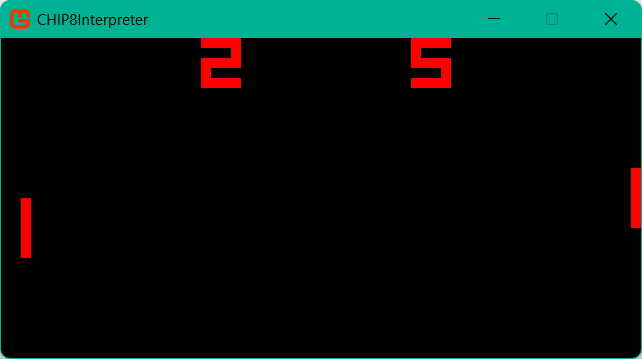
This project gave me a lot of insights into the inner workings of a computer system from a very low level. The interpreter functions like a basic CPU, taking binary data that is not human readable and transforming it into working programs like Pong or Lunar Lander. I had a basic understanding of how computers work under the hood, but this project allowed me to actually apply these concepts, exposing and filling many gaps in my knowledge along the way. To get into specifics, some parts I found particularly interesting were the subroutine stack, the decoder, and the executor.
Subroutine Stack
The subroutine stack was an interesting look into a practical application of data structure as well as program flow control. Stacks function by allowing you to either push new data onto the top of the stack or pop data off of the top. The CHIP-8 uses the stack by pushing the location of the program counter to the stack before jumping to a new subroutine. Then, when it is time to return, the stack is popped and the program counter is set to that location. This allows the program to have nested subroutines and be able to return from each subroutine to the correct location. It’s an elegant solution to what is a pretty complex problem.
case 0x2:   //2NNN Subroutine, push PC to sub stack, jump PC to NNN
	_chip8.SubStack.Push(_chip8.ProgramCounter);
	_chip8.ProgramCounter = instruction.NNN;
	break;
case 0x00EE:    //00EE Return from subroutine, Set PC to sub stack and pop
	_chip8.ProgramCounter = _chip8.SubStack.Pop();
	break;
Decoder
I found the decoder to be an interesting look into how computers take the seemingly meaningless binary data and convert it into specific instructions. It is really cool to see 16 bits of data decoded into 34 different instructions along with many of the instructions being able to pass along arguments within those bits.
Executor
The executor gave me a great insight into the functioning of computers. It’s truly amazing how programs like Pong, Space Invaders, and Lunar Lander are able to be created using only 34 basic instructions. It’s a great example of how relatively simple rules can give rise to very complex results. Every instruction comes down to just reading and/or modifying data in one way or another. The most complex instruction was 0xDXYN, which is responsible for drawing sprites to the screen. But when you get down to the implementation, even that is just reading and modifying data.
Challenges I Overcame
This project presented a lot of interesting challenges to work through. By far the most complex part was the execution step of the interpreter. A lot of the instructions had very specific quirks in the way that they work that had to be properly implemented. Some of the more complex instructions like 0xDXYN (draw sprites to the screen) took a lot of trial and error to get working right. Thankfully, the test ROMs from Tim Franssen as well as the excellent guide from Tobias Langhoff proved invaluable in getting this project up and running.
Conclusion
The CHIP-8 Interpreter was a fun project that taught me a lot about the inner workings of computers. The system is just complex enough to be challenging and teach a lot of important concepts, without being so complex as to get bogged down in the implementation. You can easily have some of the basic test roms running within a day or two, which is a great motivator to complete the project. I highly recommend this project to anyone interested in learning more about the inner workings of computers.